Extending SwiftVLN
简体中文 | English
SwiftVLN training and evaluation share experiment configuration, model names, Memory, and embedding implementations. When adding a capability, keep training arguments, online inference, checkpoints, and model names consistent. See Architecture for module relationships.
1. Public extension interfaces
Interface |
Source of truth |
Constraints that need to be maintained |
|---|---|---|
Experiment configuration |
|
Parameter combinations can be verified and parsed round-trip by model name |
Training parameters |
|
Dataset, Template and model loader receive the same configuration |
Evaluation parameters |
|
Consistent with the training configuration and written into the evaluation summary |
Shell entry |
|
Environment variables are correctly passed to Python CLI |
Checkpoint |
|
New parameters and weights can be saved, restored and continued evaluation |
Testing |
|
Configuration, structure, data flow and checkpoint contract remain stable |
If the capability appears in model names, define a unique name fragment before updating the training and evaluation entry points.
2. Add an environment Backend
2.1 Define environment semantics
Add EnvironmentSpec to src/swiftvln/backends/specs.py and add _ENVIRONMENT_SPECS. Spec is responsible for simulator-independent static semantics:
Field |
Content |
|---|---|
|
Environment identifier, used for training parameters, evaluation parameters and model name |
|
Distance of Forward action |
|
Steering angle of Left/right action |
|
Navigation task system prompt |
|
Corresponding configuration file field name in evaluation parameters |
|
Whether to support Map memory |
|
Whether to output metrics grouped by trajectory type |
|
Action ID and order of output symbols |
The training Dataset obtains the prompt, action symbols and pose integration parameters through get_environment_spec(). Add environment branch to Dataset.
2.2 Implement Backend and Wrapper
Create src/swiftvln/backends/<env>/:
Documentation |
Responsibilities |
|---|---|
|
Load task configuration and apply split, datapath and GPU override |
|
Adapt emulator to |
|
Combined configuration, emulator, action parser and video hook |
|
Optional video frame collection and saving |
|
Keep exporting lightweight |
EnvWrapper must implement:
reset(episode)andstep(action);get_rgb(),get_instruction()andget_metrics();episodes,episode_over,max_stepsandenv_type;close().
Import simulator packages inside the actual loading function in Backend.create_wrapper() or config.py. Use TYPE_CHECKING in wrapper.py for simulator types so the core package remains importable without that simulator installed.
2.3 Register training and evaluation entry points
Make the following changes:
Register Backend at
_BACKEND_CLASSESatbackends/factory.py;Add environment choice and configuration path parameters in
evaluation/arguments.py;Update
ENV_TYPES, model name regularization and environment constraints atexperiment.py;Add the default trajectory path to the training script;
Add default task configuration, split and Python parameters to the evaluation script;
Add the YAML published with the package at
src/swiftvln/configs/<env>/;Add local data and scene paths to
local.env.example.
Offline trajectories for the new environment must satisfy the data contract in Section 6. The Wrapper handles simulator-specific episode fields; do not add environment-specific branches to EnvironmentEpisodeLoop or SwiftVLNInferenceSession.
3. Add a History Processor
3.1 Implement the processor
Add HistoryProcessor subclass to src/swiftvln/modeling/history/:
Method |
Contract |
|---|---|
|
Return the number of placeholder tokens before visual encoding |
|
Return |
|
Stable name to use for logs |
The result of get_output_token_count() must exactly match the first dimension returned by process(). A processor receives history frames from one sample; never mix tokens from different batch samples.
3.2 Register and pass parameters
Register the type and factory construction parameters at
modeling/history/__init__.py;Add public name in
HISTORY_PROCESSORSofexperiment.py;Add stable encoding and parsing rules for model names;
Add hyperparameters to training and evaluation arguments;
Set defaults and pass parameters in training and evaluation shells;
Create a processor with the same configuration in
SwiftVLNSft._prepare_template();Create the processor used for online evaluations in
SwiftVLNInferenceSession;Record the parameters that affect the inference results in
build_summary_extras().
3.3 Align training and online inference
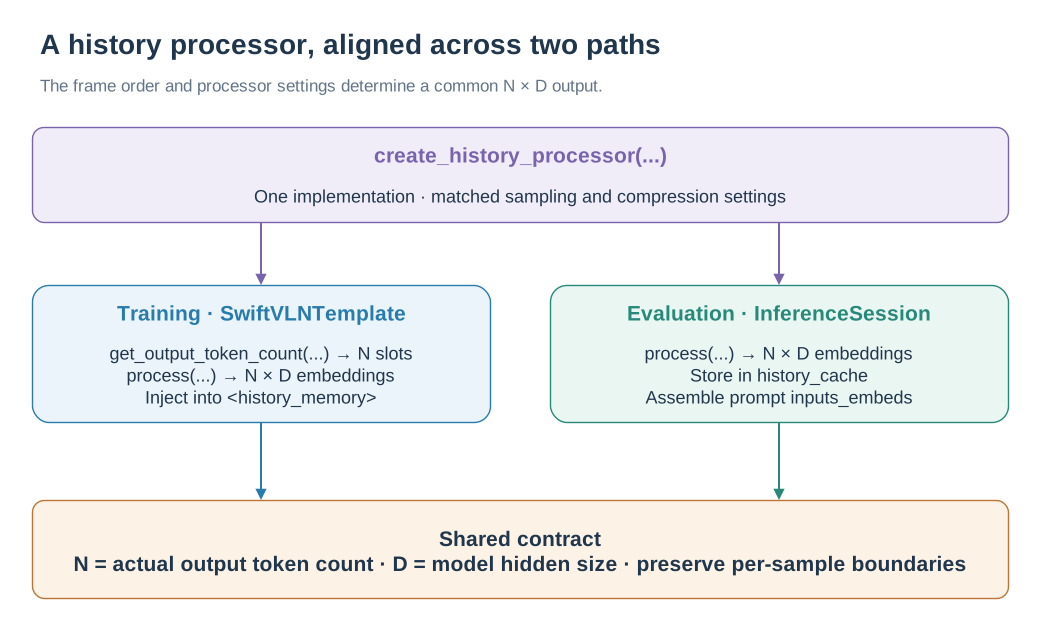
Training reserves token slots; online inference caches embeddings. Both paths use the same processor output contract.
Training-side history selection is implemented in SwiftVLNDataset._sample_history_frames(). Online cache construction is implemented in evaluation/inference/encoding.py. If a processor changes sampling or caching, update both paths.
The Template calls get_output_token_count() to create <history_memory> placeholders, then calls process() to generate embeddings. The inference session writes the process() output directly to history_cache. Both paths must use the same frame order, processor parameters, and output-token count.
4. Add an Embedding Enhancement
Embedding enhancement runs after the vision tower and before history compression. The public configuration is mutually exclusive: a model enables at most one enhancement.
4.1 Implement the module
Add BaseEmbeddingEnhancement subclass to src/swiftvln/modeling/embeddings/ to implement:
Interface |
Contract |
|---|---|
|
Both input and output are |
|
Stable log name |
The module is stored in EmbeddingEnhancementPipeline.enhancements, an nn.ModuleDict. Its parameters are therefore included automatically in the optimizer and checkpoint state_dict.
4.2 Register the public mode
Update the following together:
experiment.py:EMBEDDING_MODES, name resolution, mutual exclusion rules and auxiliary judgment functions;modeling/embeddings/__init__.py: Create module increate_embedding_pipeline();modeling/embeddings/runtime.py: declare target module, rebuild conditions and compatible alias;training/sft/arguments.pyandevaluation/arguments.py: add parameters;modeling/model.py: Read parameters from loader kwargs and write to model config;Training and evaluation shells: verify patterns, pass parameters, and generate names;
build_summary_extras(): Record inference configuration.
4.3 Add image metadata
Both the training Template and online VisualEncodingMixin call the module through model.embed_enhance(embed, H, W, **kwargs). If the enhancement requires per-image metadata beyond pose, also update:
Image metadata generation and sequence for
SwiftVLNDataset;SwiftVLNTemplateMixin._encode()with multimodal collator;Status record of
SwiftVLNInferenceSession;VisualEncodingMixin._encode_frame()and_encode_batch_frames().
The metadata sequence must be consistent with images and the per-image token boundary output by the visual tower. Save checkpoint Later, the same pipeline type, configuration, and weights should be restored when loading a model from a pure checkpoint directory.
5. Add a model family
5.1 Transformers and ms-swift registration
Added in modeling/model.py:
SwiftVLN config that inherits upstream Transformers config;
SwiftVLN model class that inherits the upstream conditional-generation model;
A loader that can add special tokens, mount enhancements and restore weights;
New models require
inputs_embedsor visual output compatible logic.
Then register Transformers class, ms-swift ModelMeta, and default model in modeling/registry.py ID, model architecture, Template and loader. register_swiftvln_models() must remain repeatable call.
5.2 Template
Create SwiftVLN Template based on the corresponding ms-swift Template in modeling/template.py and reuse it SwiftVLNTemplateMixin. New model families require confirmation:
processor image returns
image_grid_thw;Visual output can be split into individual images;
The token IDs of
<history_memory>and<current_image>are correct;Compatible with
inputs_embeds, attention mask, position IDs and generation API;The number of placeholder tokens of the History processor is consistent with the actual output.
5.3 Configuration and name
Synchronous updates:
MODEL_FAMILIES, model name prefix and parsing rules forexperiment.py;Explicit mapping of
model_type → model_familyin training and evaluation arguments;MODEL_FAMILYbranch of training and evaluation shell, default model path and running parameters;local.env.exampleand model download documents;Legal and illegal examples in model name contract.
6. Modify the data contract
6.1 Offline training data
Each trajectory directory contains annotations.json and the corresponding RGB directory. The core annotation fields are:
{
  "video": "relative/trajectory/path",
  "instructions": ["navigation instruction"],
  "actions": [-1, 1, 2, 1, 0]
}
video/rgb/ stores observation frames in temporal order. In actions, -1 represents the initial state; 0/1/2/3 correspond to STOP, forward, left, and right in EnvironmentSpec.action_symbols.
When modifying the annotation schema, synchronization is required:
trajectory generator and validation CLI;
Read, window index, and output fields for
SwiftVLNDataset;Map metadata resolver or image-by-image metadata generation;
SatNav/Habitat training data documentation.
6.2 Dataset–Template boundary
SwiftVLNDataset outputs messages, images and image count metadata. The image order is fixed to:
history images → initial observation → current observations
The new field must be able to reach the Template through ms-swift StdTemplateInputs.extra_kwargs. Template The collator needs to preserve boundaries by sample, and cannot lose correspondence after flattening image counts or metadata of different samples.
6.3 Online episodes and results
The emulator Episode’s field differences are adapted by EnvWrapper. Runner only relies on episode_id, scene_id, instruction and optional trajectory_type.
When modifying the evaluation result field, update at the same time:
SwiftVLNEvaluationRunner.evaluate_episode();ResultRecorderandevaluation/reporting.py;resume/dedup contract;
7. Verify changes
Run the contract corresponding to the change in the swiftvln-train environment:
Changes |
Test Entry point |
|---|---|
Experiment configuration and model name |
|
Backend |
|
History processor |
|
Embedding enhancement |
|
Dataset / Template |
|
Results and Recovery |
|
CLI and repository boundaries |
|
python -m unittest \
  tests.test_experiment_contract \
  tests.test_model_name_contract \
  tests.test_dataset_contracts \
  tests.test_training_structure_contract \
  tests.test_evaluation_structure_contract
Check the syntax after modifying the Shell entry:
bash -n scripts/train/train_swiftvln_qwen_vl.sh
bash -n scripts/eval/eval_by_name.sh
bash -n scripts/eval/eval_swiftvln_qwen_vl_distributed.sh
Changes to model forward or data flow also require one real optimizer step, checkpoint save and reload, and a single-episode online evaluation. For distributed changes, also verify multi-rank episode sharding, result deduplication, and interruption recovery.
8. Update documentation
Changes |
Sync Page |
|---|---|
Install dependencies and third-party repositories |
|
Base model and checkpoint |
|
Training parameters and model name |
|
Memory / embedding |
|
Training or evaluation data |
Corresponding page under |
Evaluation entry point, output and metrics |
|
Module boundary or dependency direction |