SwiftVLN Training
简体中文 | English
SwiftVLN performs supervised fine-tuning on offline expert trajectories. SatNav and Habitat share the same training entry point; select the environment with VLN_ENV_TYPE.
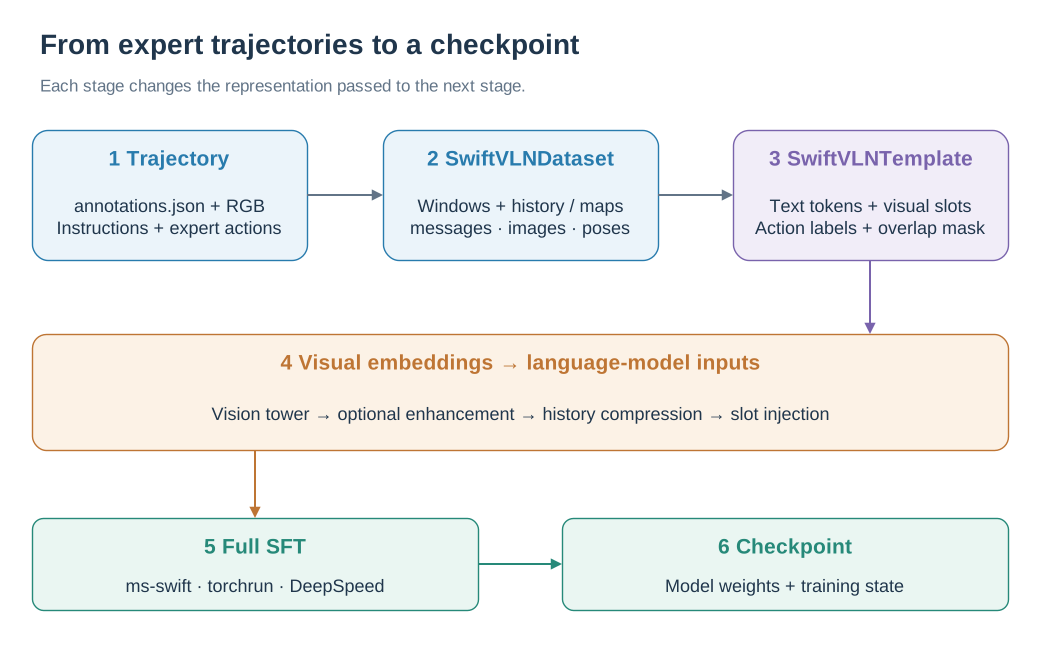
Trajectory windows become multimodal conversations, then embeddings and supervised action labels.
SwiftVLNDataset packages images and expert action text into windowed conversations. The Template builds visual placeholders and labels; after visual encoding, history tokens are compressed and injected into those positions. Assistant action turns provide supervision, while retained overlap turns supply context with masked loss. See dual memory and sliding windows for the token layout and loss definition.
1. Prepare environment and data
Follow Installation to create the swiftvln-train environment and prepare the required data:
Enter the repository and load the local configuration:
cd /path/to/SwiftVLN
export SWIFTVLN_ROOT="${PWD}"
source .local/env.sh
source "${SWIFTVLN_CONDA_SH}"
conda activate swiftvln-train
This page uses Qwen2.5-VL 3B by default:
export MODEL_FAMILY=qwen2_5_vl
export MODEL_PATH="${SWIFTVLN_QWEN25_MODEL_PATH}"
Set when using Qwen3-VL:
export MODEL_FAMILY=qwen3_vl
export MODEL_PATH="${SWIFTVLN_QWEN3_MODEL_PATH}"
export USE_LIGER_KERNEL=false
2. Default training configuration
The training entry point is:
bash scripts/train/train_swiftvln_qwen_vl.sh
The main training parameters are as follows:
Parameters |
Default value |
Meaning |
|---|---|---|
|
|
Base model series |
|
|
Update model parameters using Full SFT |
|
|
Number of complete training epochs |
|
|
The number of action frames contained in each training sample |
|
|
Number of actions predicted per round based on current observations |
|
|
Number of overlapping actions in adjacent training windows |
|
|
Batch size for each GPU |
|
|
Number of gradient accumulation steps |
|
|
Initial learning rate |
|
|
Maximum token length of a single training sample |
Precision |
|
Training numerical precision |
|
|
Attention implementation |
|
|
DeepSpeed distributed optimization configuration |
2.1 Trajectory window
Long trajectories are divided into training windows according to NUM_FRAMES. The stride of adjacent windows is:
window stride = NUM_FRAMES - NUM_OVERLAP
NUM_OVERLAP is measured in actions. Overlapping actions in every window after the first provide context only; the loss for their corresponding assistant turns is masked:
masked turns = NUM_OVERLAP / NUM_FUTURE_STEPS
Under the default NUM_FRAMES=32, NUM_FUTURE_STEPS=4:
|
Window stride |
Masked turns |
|---|---|---|
|
|
|
|
|
|
|
|
|
|
|
|
NUM_OVERLAP must be less than NUM_FRAMES and divisible by NUM_FUTURE_STEPS. in model name overlap<N> records the number of overlapping actions.
2.2 GPU and effective batch size
Valid batch sizes are:
BATCH_SIZE × GRAD_ACCUM_STEPS × number of GPUs
Use the first N visible GPUs:
TRAIN_NUM_GPUS=8 bash scripts/train/train_swiftvln_qwen_vl.sh
Specify GPU:
TRAIN_CUDA_DEVICES=0,2,4,6 bash scripts/train/train_swiftvln_qwen_vl.sh
3. Memory training configuration
By default, SatNav training uses per-frame history. SwiftVLN also supports random or temporally biased history-frame sampling, Map memory, GTC, Segment-GTC, initial observations, relative poses, and the Satellite-to-UAV Stage-A adapter.
For the configurations and training commands shared by SatNav and Habitat, see Memory configuration. Map memory supports SatNav only.
5. Habitat training
Habitat verified per-frame reference, no-memory, random, temporal-biased, initial, PoseFiLM, GridToMe, Additive pose, GTC and Segment-GTC. Satellite-to-UAV Stage-A adapter and Map memory are not supported on Habitat.
5.1 Configure training data
A complete Habitat training run combines R2R, RxR, and EnvDrop:
export VLN_ENV_TYPE=habitat
export VLN_DATA_PATH="${SWIFTVLN_HABITAT_R2R_TRAIN_PATH},${SWIFTVLN_HABITAT_RXR_TRAIN_PATH},${SWIFTVLN_HABITAT_ENVDROP_TRAIN_PATH}"

test -f "${SWIFTVLN_HABITAT_R2R_TRAIN_PATH}/annotations.json"
test -f "${SWIFTVLN_HABITAT_RXR_TRAIN_PATH}/annotations.json"
test -f "${SWIFTVLN_HABITAT_ENVDROP_TRAIN_PATH}/annotations.json"
When using only part of the dataset, connect the corresponding trajectory directories by commas:
export VLN_DATA_PATH="${SWIFTVLN_HABITAT_R2R_TRAIN_PATH},${SWIFTVLN_HABITAT_RXR_TRAIN_PATH}"
5.2 Start full training
Start training using 8 GPUs:
TRAIN_NUM_GPUS=8 bash scripts/train/train_swiftvln_qwen_vl.sh
5.3 Output model name
The model name generated by the above configuration is:
swiftvln-habitat-3b-1ep-f32s4-overlap0-pf-h8-b1.0-pool-s2-noembed-bs64-lr2e-5-<HHMMSS>
name fragment |
meaning |
|---|---|
|
SwiftVLN Habitat Model |
|
Qwen2.5-VL 3B |
|
Train for one epoch |
|
Each trajectory window contains 32 frames, predicting 4 actions per round |
|
Adjacent windows do not overlap |
|
Per-frame memory, using 8 history frames and uniform sampling |
|
Average pooling, compression stride is 2 |
|
Do not use embedding enhancement |
|
Valid batch size |
|
Learning rate |
|
Training start time |
The model is saved to output/swiftvln/<model-name>/. The habitat segment selects the Habitat backend during evaluation; the remaining segments record the model and trajectory-window configuration used for training.
6. Resume training
A full restore loads the model, optimizer, scheduler, random number state, and global step. Reuse the original training task, Model, data, number of GPUs and training parameters:
export RUN_ROOT=/path/to/output/run-name
export CHECKPOINT="${RUN_ROOT}/v0-YYYYMMDD-HHMMSS/checkpoint-1000"

OUTPUT_DIR_OVERRIDE="${RUN_ROOT}" \
RESUME_FROM_CHECKPOINT="${CHECKPOINT}" \
RESUME_ONLY_MODEL=false \
bash scripts/train/train_swiftvln_qwen_vl.sh
A new vN-<date>-<time>/ directory will be created under the same RUN_ROOT to save subsequent checkpoints.
Load only the model weights and recreate the optimizer and scheduler:
OUTPUT_DIR_OVERRIDE=/path/to/output/new-run \
RESUME_FROM_CHECKPOINT=/path/to/checkpoint-1000 \
RESUME_ONLY_MODEL=true \
bash scripts/train/train_swiftvln_qwen_vl.sh