SwiftVLN Evaluation
简体中文 | English
SwiftVLN provides one entry point for online evaluation on SatNav and Habitat. The evaluation script restores the training configuration from the model name, loads the corresponding checkpoint, and distributes episodes across the selected GPUs.
Environment |
Default Split |
Scene |
Max Steps |
|---|---|---|---|
SatNav |
|
GeoTIFF |
500 |
Habitat |
|
MP3D |
500 |
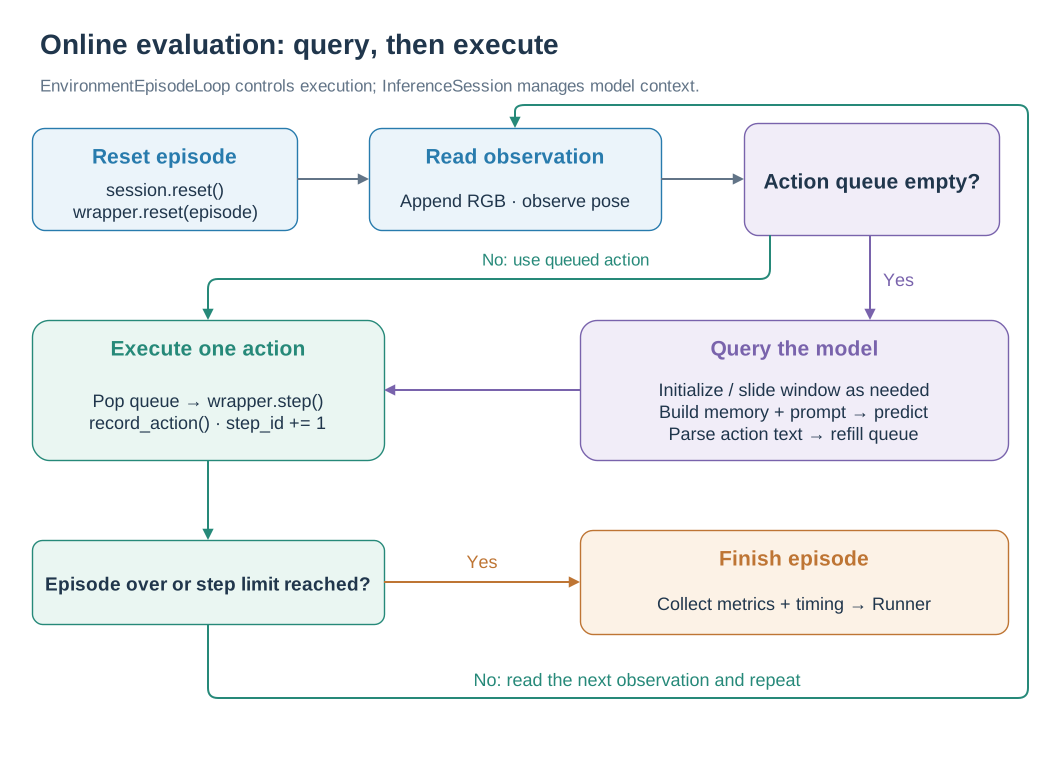
Only an empty action queue triggers a model query; each environment step executes one queued action.
At episode start, the loop resets the environment and inference session. Each step collects an RGB frame and the current pose. When the action queue is empty, the session initializes or advances the window, prepares memory and context, and predicts the next action sequence. The loop executes one action at a time and records its effect on pose. An empty parsed action sequence falls back to STOP. The episode finishes when the environment reports completion or reaches its step limit. See the episode-loop implementation and window and memory updates.
1. Prepare the evaluation environment
Complete before you begin:
Installation: create the
swiftvln-evalenvironment.Models and checkpoints: download a model or prepare a trained checkpoint.
Evaluation data: configure episode and scene paths.
Enter the repository and activate the evaluation environment:
cd /path/to/SwiftVLN
export SWIFTVLN_ROOT="${PWD}"

source .local/env.sh
source "${SWIFTVLN_CONDA_SH}"
conda activate swiftvln-eval
The evaluation entry point is:
bash scripts/eval/eval_by_name.sh "${MODEL_NAME}"
2. Model name and Checkpoint
The model name also records the environment, base model, trajectory window, memory, history processor, system prompt and embedding enhancement. Use the full model name corresponding to the checkpoint when evaluating.
Default SatNav model:
export MODEL_NAME=swiftvln-satnav-3b-1ep-f32s4-overlap0-pf-h8-pool-s2-noembed
python -m swiftvln.experiment parse-name "${MODEL_NAME}" --format json
Habitat Qwen2.5-VL 3B model:
export MODEL_NAME=swiftvln-habitat-3b-1ep-f32s4-overlap0-pf-h8-pool-s2-noembed
python -m swiftvln.experiment parse-name "${MODEL_NAME}" --format json
For Qwen3-VL 2B, set:
export MODEL_NAME=swiftvln-habitat-qwen3vl-2b-1ep-f32s4-overlap0-pf-h8-pool-s2-noembed
eval_by_name.sh finds models in the following order:
Priority |
Model Position |
|---|---|
1 |
The checkpoint or Hugging Face model directory specified by the environment variable |
2 |
checkpoint in |
3 |
|
After downloading a model according to the checkpoint guide, use the standard directory directly:
export MODEL_PATH="${SWIFTVLN_ROOT}/output/model_zoo/swiftvln/HF_model/${MODEL_NAME}"
Specify checkpoint when evaluating local training results:
export MODEL_PATH=/path/to/checkpoint-step
3. Check the evaluation configuration
CHECK_ONLY=true parses the model name, displays the model path and evaluation parameters to be used, and does not load the model or start it. torchrun:
CHECK_ONLY=true \
EVAL_SPLIT=val_seen \
CUDA_DEVICES=0 \
bash scripts/eval/eval_by_name.sh "${MODEL_NAME}"
The default SatNav checkpoint name is:
swiftvln-satnav-3b-1ep-f32s4-overlap0-pf-h8-pool-s2-noembed
The parsed result should contain:
Environment:    satnav
NUM_FRAMES:     32
NUM_FUTURE_STEPS: 4
NUM_OVERLAP:    0
MEMORY_METHOD:  history
HISTORY_PROCESSOR_TYPE: per_frame
NUM_HISTORY:    8
COMPRESS_STRIDE: 2
EMBEDDING_MODE: none
Configuration checks do not read episodes and scenarios; actual evaluation commands verify the model, data, simulator, and inference pipeline at the same time.
5. Habitat evaluation
5.1 Evaluation configuration
Habitat evaluation is configured in the following locations:
Configuration |
Location |
Content |
|---|---|---|
Task configuration |
|
Habitat simulator, RGB sensor, actions, success distance, metrics, and default R2R paths |
Local paths |
|
R2R episodes and MP3D scenes |
Model configuration |
SwiftVLN model name |
Model family, trajectory window, Memory, history processor, system prompt, and embedding enhancement |
Runtime configuration |
Launch-command environment variables |
Split, GPUs, output directory, and video |
eval_by_name.sh selects the default task configuration automatically. To use a custom Habitat configuration:
export EVAL_CONFIG_PATH=/path/to/habitat_r2r_eval.yaml
Set the R2R and MP3D paths in .local/env.sh:
export SWIFTVLN_HABITAT_DATA_ROOT="/path/to/streamvln_datasets"
export SWIFTVLN_HABITAT_SCENES_DIR="${SWIFTVLN_HABITAT_DATA_ROOT}/scene_datasets"
export SWIFTVLN_HABITAT_R2R_EVAL_DATA_PATH="${SWIFTVLN_HABITAT_DATA_ROOT}/datasets/r2r/{split}/{split}.json.gz"
Habitat evaluates val_unseen by default. Set EVAL_SPLIT=val_seen explicitly to evaluate val_seen.
5.2 Evaluation scripts
Habitat and SatNav use the same evaluation entry points:
Script |
Purpose |
|---|---|
|
Recommended entry point; restores Habitat, model-family, and Memory configuration from the model name and locates the checkpoint |
|
Low-level entry point using an explicit Habitat configuration, model path, and inference parameters |
|
Add multiple models to the file queue and evaluate them sequentially |
After downloading the Qwen2.5-VL 3B model, set:
export MODEL_NAME=swiftvln-habitat-3b-1ep-f32s4-overlap0-pf-h8-pool-s2-noembed
export MODEL_PATH="${SWIFTVLN_ROOT}/output/model_zoo/swiftvln/HF_model/${MODEL_NAME}"
For Qwen3-VL 2B, only the model name changes; eval_by_name.sh sets MODEL_FAMILY=qwen3_vl
automatically:
export MODEL_NAME=swiftvln-habitat-qwen3vl-2b-1ep-f32s4-overlap0-pf-h8-pool-s2-noembed
export MODEL_PATH="${SWIFTVLN_ROOT}/output/model_zoo/swiftvln/HF_model/${MODEL_NAME}"
Check the evaluation configuration:
CHECK_ONLY=true \
EVAL_SPLIT=val_unseen \
CUDA_DEVICES=0 \
bash scripts/eval/eval_by_name.sh "${MODEL_NAME}"
When calling the low-level script directly, pass the Habitat environment and model parameters explicitly:
ENV_TYPE=habitat \
MODEL_NAME="${MODEL_NAME}" \
MODEL_PATH="${MODEL_PATH}" \
MODEL_FAMILY=qwen2_5_vl \
EVAL_SPLIT=val_unseen \
CUDA_DEVICES=0 \
bash scripts/eval/eval_swiftvln_qwen_vl_distributed.sh
Set MODEL_FAMILY=qwen3_vl when directly evaluating the Qwen3-VL 2B model.
Queue a locally trained model for evaluation:
bash scripts/queue/enqueue_eval.sh "${MODEL_NAME}"
CUDA_DEVICES=0,1,2,3 bash scripts/queue/eval_queue.sh
5.3 Single- and multi-GPU evaluation
Evaluate val_unseen on one GPU:
EVAL_SPLIT=val_unseen \
CUDA_DEVICES=0 \
bash scripts/eval/eval_by_name.sh "${MODEL_NAME}"
Evaluate val_unseen on multiple GPUs:
EVAL_SPLIT=val_unseen \
CUDA_DEVICES=0,1,2,3,4,5,6,7 \
bash scripts/eval/eval_by_name.sh "${MODEL_NAME}"
Evaluate val_seen followed by val_unseen:
for split in val_seen val_unseen; do
EVAL_SPLIT="${split}" \
CUDA_DEVICES=0,1,2,3,4,5,6,7 \
bash scripts/eval/eval_by_name.sh "${MODEL_NAME}"
done
Set MAX_EPISODES to evaluate a small number of episodes:
MAX_EPISODES=1 \
EVAL_SPLIT=val_unseen \
CUDA_DEVICES=0 \
bash scripts/eval/eval_by_name.sh "${MODEL_NAME}"
Habitat results use the shared directory and metric formats described in Section 7.
7. Results and metrics
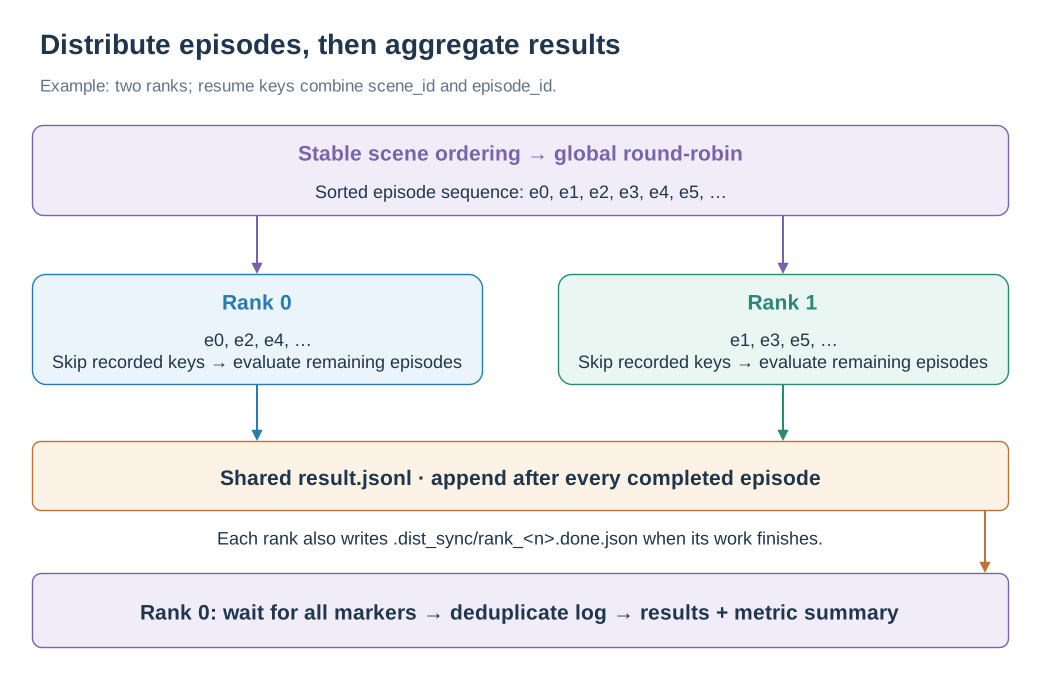
Ranks append to a shared episode log; rank 0 waits for completion markers before deriving the final results.
The runner groups episodes by scene, sorts scene names, and assigns the resulting sequence round-robin across ranks. On resume, each rank reads result.jsonl and skips recorded scene_id::episode_id keys. Each completed episode adds a row to this shared log. After all rank completion markers are present, rank 0 deduplicates the log by episode key and writes the final results and metric summary. See runner.py and results.py.
Each split generates a separate directory:
results/eval/swiftvln/<model-name>/<split>/<timestamp>/
├── result.jsonl
├── all_results.jsonl
├── evaluation_summary.json
├── timing_summary.json
├── videos/                    # SAVE_VIDEO=true
└── .dist_sync/
    └── rank_<n>.done.json
File |
Content |
|---|---|
|
Append-only per-episode log used for resume |
|
Episode-by-episode results sorted and deduplicated after the evaluation is completed |
|
Summary metrics, model configuration, split and number of GPUs |
|
Average runtime of each inference stage |
|
Completion markers for distributed ranks |
Summary metrics include:
Fields |
Metrics |
|---|---|
|
Success Rate(SR) |
|
Success weighted by Path Length(SPL) |
|
Oracle Success(OS) |
|
Average endpoint navigation error (NE, meters) |
|
Average number of execution steps |
|
Number of Episodes participating in the summary |
When a runtime error occurs for a single Episode, the result is retained in JSONL and contains the error field.